TSX & Typed Components_Type Safety
TSX & Typed Components: Mastering Type Safety in React
1. Problem Statement
Case Study: Secure Banking Dashboard
A financial institution is building a React dashboard to handle high-stakes transactions:
-
Transaction records must have strictly typed properties (ID, amount, currency, timestamp).
-
Balance calculations must prevent type mismatches (e.g., adding USD to EUR).
-
Audit logs require immutable state with strict type checks to prevent tampering.
-
A single type error could lead to financial discrepancies or regulatory violations.
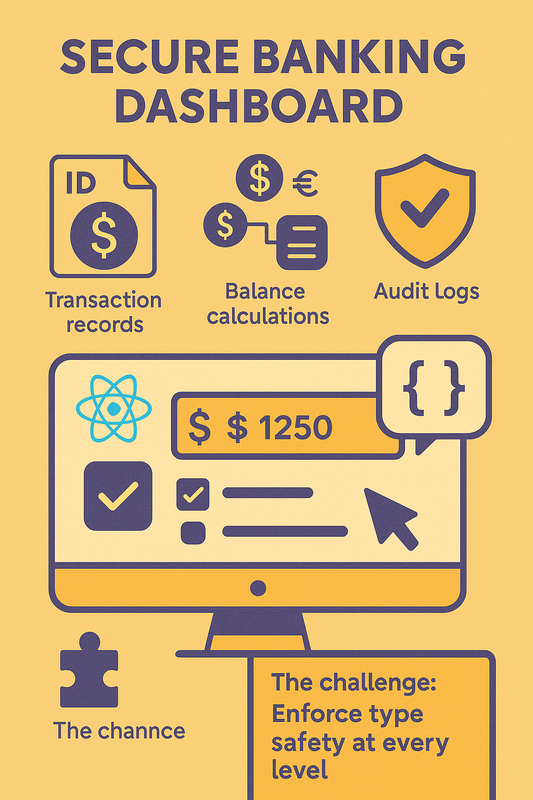
The challenge:
How do you enforce type safety at every level—props, state, events, and API responses—while maintaining React’s flexibility and developer productivity?
2. Learning Objectives
By the end of this tutorial, you will:
-
Define type-safe props using interfaces and type aliases.
-
Implement strictly typed state in functional and class components.
-
Handle complex state scenarios with
useState,useReducer, and generics. -
Type class components with lifecycle methods and inherited props.
-
Avoid common pitfalls like
anytypes and implicit type coercion.
3. Concept Introduction with Analogy
Analogy: The Bank’s Type-Safe Vault System
Imagine a bank vault where:
-
Props are deposit slips: They must specify exact currency, amount, and account numbers.
-
State is the ledger: Every entry is validated against strict schemas before being recorded.
-
Class Components are vault managers: They follow strict protocols (lifecycles) to handle transactions.
-
Functional Components are tellers: Quick and efficient, but bound by the same type rules.
TypeScript in React is this vault system: It ensures every "transaction" (data flow) is validated against a precise contract.
4. Technical Deep Dive
A. Props: Contracts for Component Input
1. Interfaces vs. Type Aliases
// Interface: Extensible via declaration merging
interface TransactionProps {
  id: string;
  amount: number;
  currency: 'USD' | 'EUR' | 'GBP';
}

// Type Alias: Fixed structure, supports unions
type PaymentMethod = 'credit' | 'debit';
type PaymentProps = {
  method: PaymentMethod;
  fee: number;
};
-
Use interfaces for public APIs (extendable).
-
Use type aliases for unions/utilities.
2. Optional vs. Required Props
interface UserProfileProps {
  name: string;
  age?: number; // Optional
}
age?: numbervs.age: number | undefined: The former allows omission.
3. Default Props
// Functional Component
const Greeting: React.FC<{ message?: string }> = ({ message = 'Hello' }) => (
  <h1>{message}</h1>
);

// Class Component
class Greeting extends React.Component<{ message?: string }> {
  static defaultProps = { message: 'Hello' };
  render() { return <h1>{this.props.message}</h1>; }
}
B. State: Typing Component Internal Data
1. useState with Type Inference
const [balance, setBalance] = useState<number>(0); // Explicit
const [currency, setCurrency] = useState('USD');    // Inferred as string
2. Complex State with useReducer
type TransactionAction =
  | { type: 'deposit'; amount: number }
  | { type: 'withdraw'; amount: number };

interface TransactionState {
  balance: number;
  history: Array<{ type: string; amount: number }>;
}

const reducer = (state: TransactionState, action: TransactionAction): TransactionState => {
  switch (action.type) {
    case 'deposit': return { ...state, balance: state.balance + action.amount };
    case 'withdraw': return { ...state, balance: state.balance - action.amount };
    default: return state;
  }
};
3. Immutable State Patterns
// Use Readonly/ReadonlyArray to prevent mutations
interface AccountState {
  readonly transactions: ReadonlyArray<Transaction>;
}
C. Functional Components: Advanced Typing
**1.  `React.FC`  vs. Explicit Return Types**

// Implicit return type (avoid unless simple)
const DepositButton: React.FC<{ onClick: () => void }> = ({ onClick }) => (
  <button onClick={onClick}>Deposit</button>
);

// Explicit return type (better for complex logic)
const WithdrawButton = ({ onClick }: { onClick: () => void }): JSX.Element => {
  return <button onClick={onClick}>Withdraw</button>;
};
2. Generics in Functional Components
type CurrencyConverterProps<T extends string> = {
  currencies: T[];
  onConvert: (amount: number, from: T, to: T) => number;
};

const CurrencyConverter = <T extends string>({
  currencies,
  onConvert
}: CurrencyConverterProps<T>) => (
  // Component logic
);
D. Class Components: Full Type System Integration
1. Props and State Type Parameters
interface AccountProps {
  accountId: string;
}

interface AccountState {
  balance: number;
  isLocked: boolean;
}

class AccountManager extends React.Component<AccountProps, AccountState> {
  state: AccountState = { balance: 0, isLocked: false };
  // Lifecycle methods with type context
}
2. Typing Lifecycle Methods
componentDidUpdate(prevProps: AccountProps, prevState: AccountState) {
  if (this.props.accountId !== prevProps.accountId) {
    // Fetch new account data
  }
}
5. Step-by-Step Data Modeling & Code Walkthrough
A. Transaction List Component (Functional)
interface Transaction {
  id: string;
  amount: number;
  currency: 'USD' | 'EUR';
  date: Date;
}

interface TransactionListProps {
  transactions: Transaction[];
  onSelect: (id: string) => void;
}

const TransactionList: React.FC<TransactionListProps> = ({
  transactions,
  onSelect
}) => (
  <ul>
    {transactions.map(tx => (
      <li key={tx.id} onClick={() => onSelect(tx.id)}>
        {tx.amount} {tx.currency} - {tx.date.toLocaleDateString()}
      </li>
    ))}
  </ul>
);
B. Transaction Form (Class Component)
interface TransactionFormState {
  amount: string;
  currency: 'USD' | 'EUR';
}

interface TransactionFormProps {
  onSubmit: (amount: number, currency: 'USD' | 'EUR') => void;
}

class TransactionForm extends React.Component<TransactionFormProps, TransactionFormState> {
  state: TransactionFormState = { amount: '', currency: 'USD' };

  handleSubmit = (e: React.FormEvent) => {
    e.preventDefault();
    this.props.onSubmit(Number(this.state.amount), this.state.currency);
  };

  render() {
    return (
      <form onSubmit={this.handleSubmit}>
        <input
          type="number"
          value={this.state.amount}
          onChange={e => this.setState({ amount: e.target.value })}
        />
        <select
          value={this.state.currency}
          onChange={e => this.setState({ currency: e.target.value as 'USD' | 'EUR' })}
        >
          <option value="USD">USD</option>
          <option value="EUR">EUR</option>
        </select>
        <button type="submit">Submit</button>
      </form>
    );
  }
}
6. Interactive Challenge / Mini-Project
Your Task:
Build a BudgetTracker component that:
-
Tracks income and expenses in different currencies.
-
Shows net balance in a selected currency.
-
Uses
useReducerfor state management. -
Implements type-safe props for currency conversion rates.
Requirements:
-
Define interfaces for
IncomeEntryandExpenseEntry. -
Create a reducer with
addIncomeandaddExpenseactions. -
Prevent negative balances through type-safe checks.
7. Common Pitfalls & Best Practices
| Pitfall | Best Practice |
|---|---|
Using any for props/state | Always define explicit types |
| Optional props without defaults | Use Required<T> or defaultProps |
| Mutating state directly | Use read-only types and immutable updates |
| Ignoring type inference | Let TypeScript infer when possible |
| Complex unions without validation | Use Zod or Yup for runtime validation |
8. Optional: Programmer’s Workflow Checklist
-
Define interfaces/types before writing components.
-
Validate props with PropTypes or runtime checks.
-
Use
Readonly<T>for state immutability. -
Test type boundaries (e.g., max currency values).
-
Audit type definitions with
tsc --noEmit.